5 Tools That Will Make You an Online Presence Wizard (or Just Look Like One!)

Let’s face it, as small business owners and entrepreneurs, we’re all looking for ways to save time and frustration.  We’re always on the lookout for shortcuts to all things that will represent us and our companies as the fabulous entities we are.  Finding great tricks to improve our online presence is no exception.  Each of these tools will do just that for you, and every one of them is FREE!

For Website Direction: WhatWPThemeIsThat.com

WordPress Web Design Ideas

If you’re planning to build your site (or have it built) with WordPress, you’ve seen a website that really blew you away and you’d like to do something similar with your website, this tool is for you.  It’s not always easy to tell what theme is being used, especially if there’s no WordPress theme link or name provided in the footer.

If you know your way around your browser enough to reveal the HTML source, you can hunt down the info that way.  Otherwise, use this service to find out.  Besides discovering  what theme is being used, you’ll be able to see what plugins are active on the site.


For Professional Quality Graphics: PicMonkey.com


Graphic Design for Everyone

For everything from your Facebook Cover Photo to illustrated quotes and other fun things you can use in your social media, on your website and for your blog posts.

PicMonkey makes photo editing and graphic design easy and accessible to everyone.  In their words, they “want your images to show your creativity, your style, your spot-on brilliance” because they want you to “rock the universe”.  I’ll have some of that!

Oh, and pssst… if you’re looking for a photo editor like Picnik…yep, that’s them.  Here are just a few examples of things you can do with PicMonkey:

PicMonkey Graphic Design
Small Business Blog Design

Thanks to Lynn Bardowski, Million Dollar Party Girl, for sharing her PicMonkey creation!


For Content Curation: Alltop.com

online-wizard-tools_Alltop

Alltop collects headlines from the best sites and blogs that cover any given topic.  Then they “aggregate” them into individual web pages displaying the five most recent headlines pulled from the information sources as well as their first paragraph.  Topics run from adoption to zoology with photography, food, fashion, automobiles, and more along the way.

You can think of Alltop as the “online magazine rack” of the web. They subscribe to thousands of sources to provide “aggregation without aggravation.”


For Custom Facebook Tabs: WooBox’s HTML Fangate App

Custom Facebook Tabs with WooBox

Display anything you want using HTML, an uploaded image or a URL; perfect for bits of code generated by other apps like your e-mail marketing program to add an opt-in form to your Facebook Page.  It’s free, feature-packed, and extremely popular.

Custom Tab Icons Use your own tab icon or select one from the library

Fangate Your Content Show content to users only after they Like your Page

WYSIWYG Editor Makes it easy to create and make changes to your tab without typing HTML

Custom Tab Name Default is Welcome, but you can rename it whatever you like

Image Hosting Woobox will host your images for you – no hosting account required

Totally Free & No Branding Not even a powered by link


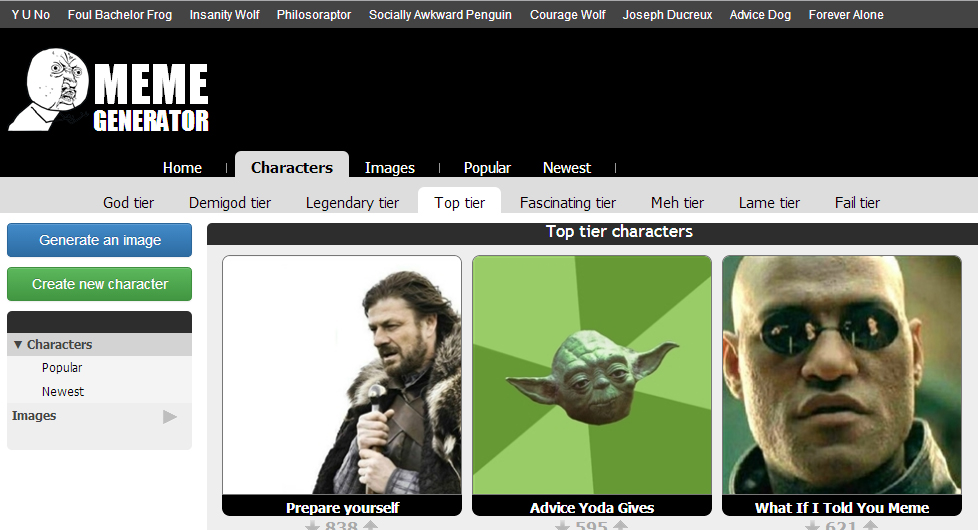
Just for Fun: Meme Generator

Memes for Social Media Fun

You’ve seen them everywhere on social media – Grumpy Cat, Yoda Wisdom, The Most Interesting Man in the World, Fist Pump Baby and so on.   With Meme Generator, you can create your own memes with  custom captions to amaze and amuse your audience.  For example:

Social Media Meme

So there are 5 of my favorite online presence tools – I have a ton of ‘em! – I sense a blog post sequel brewing!!  What are some of the online tools that make your website, social media marketing and/or e-mail marketing life easier?


teach-to-fish-give-a-fish_blogAward-winning web professional Bonny Clayton, aka Your Web Chick, offers web design, support and maintenance for small business, with a specialty in WordPress.

A Tech Geek with a Creative Streak℠, she helps small business owners and entrepreneurs everywhere establish and maintain their online presence. She is committed to serving them according to their needs, whether that means “giving them a fish” or “teaching them to fish”.


your-two-cents2What are some of the online tools that make your web site, social media marketing and/or e-mail marketing life easier?  

Share with Your Web Chick’s readers in the comments below.

Share This...

Done-for-You: Email Marketing Comparison

Which Email Marketing Service Provider is Right for Your Small Business?I surveyed my readers and found out that their #1 challenge with e-mail marketing is designing a newsletter template. Tied for a close second?  Deciding which one best fits my needs and Finding a service I can afford.

If you know at all what I’m about, you know I believe your website, your social media and your e-mail marketing all need to work together as a cohesive unit to get you traffic and conversions. If you’ve been putting off committing to an e-mail marketing provider because it’s all too overwhelming (and/or time-consuming) to compare pricing and features and flipping back and forth between websites to do that comparison, I’m here to rescue you! I’ve done the research on 5 of the top e-mail marketing providers for small business and compiled it for you below.

An important thing to note: Don’t let settling on an e-mail marketing service intimidate you. You are not going to be “stuck” with a company that you may decide after a few months really doesn’t fit your needs (or you’ve grown so much, it no longer fits your needs). Virtually every e-mail marketing site will allow you to export your existing list; you will then be able to import it to your new site.

MONTHLY PRICING

Monthly Plan A Monthly Plan B Monthly Plan C
AWeber $19/500 subscribers $29/501-2,500 $49/2,501-5,000
Constant Contact $15/500 subscribers $30/501-2,500 $50/2,501-5,000
iContact $14/500 subscribers $29/501-2,500 $47/2,501-5,000
MailChimp FREE up to 2,000 contacts/ 12,000 e-mails per month $10/up to 500 contacts, unlimited e-mails $15/,000 contacts; unlimited e-mails
VerticalResponse $10/500 subscribers $28/501-2,000 $46/2,001-4,000

OTHER PRICING INFO

Trial Offer Pay-As-You-Go Nonprofit Discount
AWeber $1/30 days N/A 3 months free; 25% off thereafter
Constant Contact 100 FREE e-mails N/A 20% off with 6 month prepay
iContact 30 days FREE N/A FREE in NC; all others 20% off
MailChimp FREE up to 2,000 contacts $.03/e-mail 15% off
VerticalResponse 500 FREE e-mails 1.5¢/e-mail 10,000 free e-mails/month

ADDITIONAL CONSIDERATIONS

Autoresponders?

Ease of Use
(1 = simple; 5 = intricate)

AWeber Included 4
Constant Contact Included 3
iContact Included 3
MailChimp Incl with Pay as You Go
or monthly paid plans
2
VerticalResponse In Development 1

Autoresponders, in case you don’t know, are part of an automated campaign that sends out an e-mail or series of e-mails when a triggering event occurs.  The trigger could be someone submitting the opt-in form on your website, clicking through to an offer from one of your landing pages, or any number of other events.  This is kind of an advanced e-mail marketing technique and not something you necessarily need to jump into right away.

When rating ease of use, I considered several factors such as how simple it is to create really great-looking e-mail newsletter templates, how straightforward the import/export procedure for lists is and general ease of navigation.

My personal favorite is.  Yep, that’s an affiliate link.  If you click on it and sign up, I get a kickback the first time you send an e-mail.  But I would highly recommend their service even without the commission; I use it myself and continue to recommend it verbally, even when there’s nothing in it for me.  They offer the very best pay-as-you-go pricing (one of the few that does at all), so when you don’t use it you don’t pay for it; very beneficial when you’re just starting out in e-mail marketing.  They have a lot of great ready-made templates but I also LOVE their template wizard – it is SO EASY to create highly customized, great-looking newsletters, even from scratch.

So there’s my run-down for ya.  If you still have questions or need guidance in helping you choose an e-mail marketing provider, comment below and I’ll get back to you!


teach-to-fish-give-a-fish_blogAward-winning web professional Bonny Clayton, aka Your Web Chick, offers web design, support and maintenance for small business, with a specialty in WordPress.

A Tech Geek with a Creative Streak℠, she helps small business owners and entrepreneurs everywhere establish and maintain their online presence. She is committed to serving them according to their needs, whether that means “giving them a fish” or “teaching them to fish”.


your-two-cents2If you still have questions about pricing or determining the best e-mail marketing provider for your business, feel free to ask
 in the comments below!  I will make every effort to respond to all inquiries!

Share This...

Basics of Social Media Strategy for Small Business

Reach The World from Your LaptopFor small business owners and entrepreneurs with limited marketing budgets, social media can be overwhelming.  Where do you begin?  Where are your peeps?  And, really, who has the time? It’s enough to drive you to launching a half-hearted (translated: ineffective) social media strategy.

Here are 3 basic concepts to consider that will help you rock your social media:

Commit to carry it out.  One of the key components to any social media strategy is the commitment to carry it out.  I recommend you apply your social media plan wholeheartedly or not at all.  Anything less is, essentially, a waste of time and money.  A Twitter feed or Facebook page that has been noticeably neglected for weeks (or months) reflects poorly on your company; people most likely will not bother to return.  If you lack the resources or the time to really work your plan, it may be better to postpone getting involved in social media until you’re able to dedicate a reasonable amount of time and attention to its success. Continue reading

Share This...

Top Motivational/Inspirational Songs for Small Business 2013

Perhaps Plato said it best when he opined that music ‘gives soul to the universe, wings to the mind, flight to the imagination, and charm and gaiety to life and to everything’.  Music can help us to grieve, help us to move on, help us to say what’s in our hearts when we can’t find the words, help us to cope, inspire us, motivate us and so much more.  It seems to me 2013 was an especially good year for motivational music.  As a small business owner, when my work days got a bit too long or I needed a little push to get a project completed on time or I just needed to work through some things, I’d load one or more of these tunes up in my media player and get a move on.  Here are my top favorite motivational/inspirational songs for 2013:

#4 Applause by Lady Gaga.  Just for fun, whenever I hear this on the radio, I imagine it playing as I come out onto the stage at my first huge workshop, where I’m speaking to 100+ small business owners and entrepreneurs about web design, social media and email marketing.  What?  It could happen!!

Continue reading

Share This...

Do You Need a Social Media Marketing Attitude Adjustment? – Part II

In case you’re wondering what the heck happened to Part I, you can check it out here, a reprint of the original blog post I wrote for Interconnections for Women (they disbanded in December 2014).

You probably know by now that you really should be using social media as part of your marketing efforts for your small business.  But if you’ve been putting it off and/or don’t believe your endeavors will translate into traffic (and, in a perfect world, sales/conversions), grab a pen! It may be time to ask yourself a few questions and mend your ways for the sake of measurable ROI (return on investment…of your time).

#5: Are You Posting Too Much? Not Enough??

In most cases, too much of a good thing is too much of a good thing.  A recent survey I did of my followers put “posting too often” or “only posting advertising” among their top annoyances in social media. Annoy them enough and your followers will begin to ignore everything you put out there or, worse yet, unfollow you.  By the same token, you don’t want to post too little and wind up fading into the background of your audience’s virtual mind.

Bottom line, it’s all about balance. You need to put yourself in front of them enough for them to remember you but not so much that your communications become like “white noise”. The general recommendation for the biggest social media channels are as follows (and I agree with these): blog a minimum of twice a month (if you can do it once a week, even better), post on LinkedIn weekly (if your target audience is on LinkedIn), update your Facebook page daily (but no more than three times a day, and spread them out), tweet 3 – 5 times daily (if your peeps are there – again, spread ‘em out) and spend about 15 minutes, 3 or 4 times a week on Pinterest (if your industry aligns with those users).

Continue reading

Share This...