Do You Need a Social Media Marketing Attitude Adjustment? – Part II

In case you’re wondering what the heck happened to Part I, you can check it out here, a reprint of the original blog post I wrote for Interconnections for Women (they disbanded in December 2014).

You probably know by now that you really should be using social media as part of your marketing efforts for your small business.  But if you’ve been putting it off and/or don’t believe your endeavors will translate into traffic (and, in a perfect world, sales/conversions), grab a pen! It may be time to ask yourself a few questions and mend your ways for the sake of measurable ROI (return on investment…of your time).

#5: Are You Posting Too Much? Not Enough??

In most cases, too much of a good thing is too much of a good thing.  A recent survey I did of my followers put “posting too often” or “only posting advertising” among their top annoyances in social media. Annoy them enough and your followers will begin to ignore everything you put out there or, worse yet, unfollow you.  By the same token, you don’t want to post too little and wind up fading into the background of your audience’s virtual mind.

Bottom line, it’s all about balance. You need to put yourself in front of them enough for them to remember you but not so much that your communications become like “white noise”. The general recommendation for the biggest social media channels are as follows (and I agree with these): blog a minimum of twice a month (if you can do it once a week, even better), post on LinkedIn weekly (if your target audience is on LinkedIn), update your Facebook page daily (but no more than three times a day, and spread them out), tweet 3 – 5 times daily (if your peeps are there – again, spread ‘em out) and spend about 15 minutes, 3 or 4 times a week on Pinterest (if your industry aligns with those users).

Continue reading

Share This...

Google Encrypted Search and SEO – No Need to Panic!

There’s been a lot of talk (maybe too much talk) about Google’s roll-out of encrypted search.  This has actually been a soft roll-out nearly two years in the making.  In 2011, they began encrypted searches for all users who were signed in to their Google accounts.  Now they have made the switch to secure search for all users.

What it means for SEO professionals & marketers

Yes, it is important to know what keywords and keyword phrases drive traffic to a website.  This information can be used to determine the strategies applied in website, blog and social media content.  For example, if you sell personalized jewelry, data collected from keyword searches can mean the difference between using “monogrammed necklaces” vs. “necklace with monogram” in your social media/blog posts and product descriptions on your website.  Before encrypted search data, you could find out what people were searching for and then customize your marketing and content to lean closer to what your prospects were searching for.

Bottom line: this change will affect the ­ease of access to keyword information and if you’ve been using that information to guide your marketing content, you will need to adapt your SEO techniques.

What it means in plain English

Website owners and their webmasters will no longer see keyword-specific data in their Google Analytics search statistics.  Instead, they will see “not provided” in the Keyword column, like this:

not-provided

Continue reading

Share This...

A Study in Determination: The World’s Fastest Indian

Replica of The 1920 Indian motorcycle used by Burt Munro to break the land speed record

Replica of The 1920 Indian motorcycle used by Burt Munro to break the land speed record

As a big fan of Sir Anthony Hopkins, it was only a matter of time before The World’s Fastest Indian wound up in my Netflix queue (it was one of those I just happened to miss in theaters). It recently arrived in the mailbox and I was eager to sit back, relax with Hubby and enjoy an inspiring story starring one of my favorite actors.  Little did I know I was in for a study in determination as well.

Based on a true story, Hopkins plays Burt Munro, a New Zealander with a dream 25 years in the making.  He wanted to set a world land speed record at the Bonneville Salt Flats race.  In his early 60s, when heart disease threatens his life, he mortgages his house and crosses two oceans to arrive in Los Angeles with his nearly-damaged Indian motorcycle (the ship’s crew was careless with the crate).  In L.A. he buys an old car, builds a makeshift trailer for the Indian and heads for Utah.

He meets some pretty interesting characters along the way, all the while battling his angina and living basically homeless.  He finally gets to Bonneville and the officials try to turn him away because he was not pre-registered and his motorcycle did not meet safety regulations.  Long story short, Munro is eventually allowed to participate and as one observer noted,”That is the most determined man I’ve ever seen in my entire life.”

Here are five of my favorite bits from the movie, and the lessons in determination we can learn from them: Continue reading

Share This...

Content Curation or OPC (Other People’s Content)

Content Curation or OPC

So the social media experts will all tell you that to grow your audience, you need good content. But it takes time and research to produce good content. Without an audience, how do you warrant spending that kind of time?

Or maybe you simply struggle on a weekly or perhaps daily basis to come up with ideas for things to tweet, write about on your blog, post to your Facebook page, share as a LinkedIn update, etc? Have you considered OPC (Other People’s Content)?

Providing valuable content doesn’t necessarily mean you’ve got to create it all on your own! It’s really all about posting stuff that interests your audience – regardless of where it originated!!

So where can you find OPC?

Google Images: Google anything with “quotes about” in front of it and you will find a wealth of content to post on Facebook, Twitter, etc. Now select the ‘Images’ option in Google search, like this:

Google Image Search


Example: I have a client who specializes in custom chocolates.  Doing a Google image search for ‘quotes about chocolate’, I was able to find these:


Photo Credit:
Creating Space Yoga
Photo Credit:
Polyvore
Photo Credit:
Purplle
Photo Credit:
Walls That Talk


Huffington Post (and similar article-driven sites): Plug a search term related to your industry into the search box and see what you find!

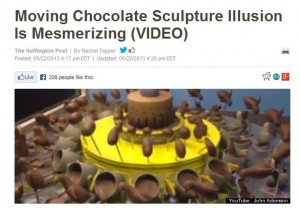
Example: Using my custom chocolate client as an example again, I searched and spotted this gem in the top 5:

Huffington Post Gem

On the same page, regaled as a ‘similar story’, was this beauty:

Huffington Post Beauty

Huffington Post makes it very easy to share content, with the Share (Facebook), Tweet (Twitter) and Pin It (Pinterest) buttons in abundance!


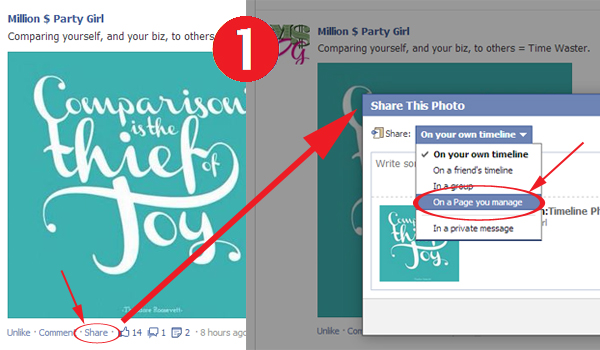
Your social media feeds: Sharing from your own feeds on Facebook, Twitter and LinkedIn is as easy as…

easy1 easy2 easy3
Disclaimer: I am not suggesting that you ‘steal’ OPC and then try to pass it off as your own.  Always always ALWAYS credit your source, even if you’re not republishing a piece of content in its entirety (when you simply click share in a social media application, your source will automatically be credited…I’m really talking about copy & pasting here).  If you’re not sure how to properly credit others whose content you’re sharing, there is an excellent article on Hubspot.  

Share This...

No More Price Banners on Pinterest!

Remember how you could type a dollar amount in the description for a ‘pin’ and like magic, Pinterest would insert a groovy little banner up in the corner over your image?  Well, NO MORE!!

no-more-price-banners

Now, with the roll-out of other ‘enhancements’ in mid-May, Pinterest has done away with those cute little banners (and the little boost it brought retailers and service providers).  They are calling these enhancements ‘rich pins’ and while they are great for users because it’ll be easier for them to buy products (as well as use recipes and browse movies), they are likely to prove quite a challenge for small business owners.  In fact, if you search for help about rich pins on Pinterest’s site, it ultimately takes you to a page ‘for developers‘.  Incorporating these rich pins into your website will require some technical knowledge.

I don’t particularly care for this ‘enhancement’, but if you are intrigued by the idea of rich pins (right now there are three kinds:  product, recipe and movies) and feel up to the challenge, you can get Pinterest’s instant answers about rich pins on their website.  Steps include inserting meta tags in your website’s code and applying via Pinterest to be allowed to use them.  If you’re not tech savvy, you might want to reach out to your web designer for help!  In the mean time, my recommendation is that you still include a price in the description where appropriate, even though you’ve lost the little visual cue in the price banner’s demise.

Share This...